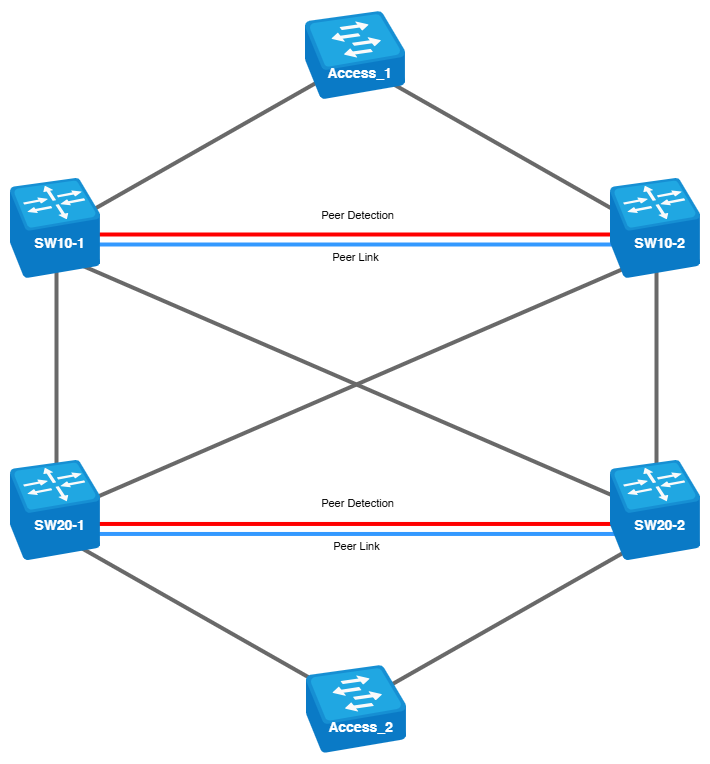
در توپولوژی VPC Back-to-Back، تحملپذیری خطا (Fault Tolerance) از طریق ترکیب دو
VPC domains (جفتهای VPC) از طریق اینترفیسهای تجمیعشده (Aggregated Interfaces) افزایش مییابد.
ویژگی کلیدی این طرح، استفاده از یک
unique domain number برای هر جفت سوئیچ است.
در این طرح، از سوئیچهای مدل MES5324A استفاده شده است.
نامهای اختصاصیافته به دستگاهها:
سوئیچهای شرکتکننده در
VPC pairs:
سوئیچهای دسترسی (Access Switches):
VPC Domains:
- Domain 10 : SW10-1 and SW10-2
- Domain 20 : SW20-1 and SW20-2
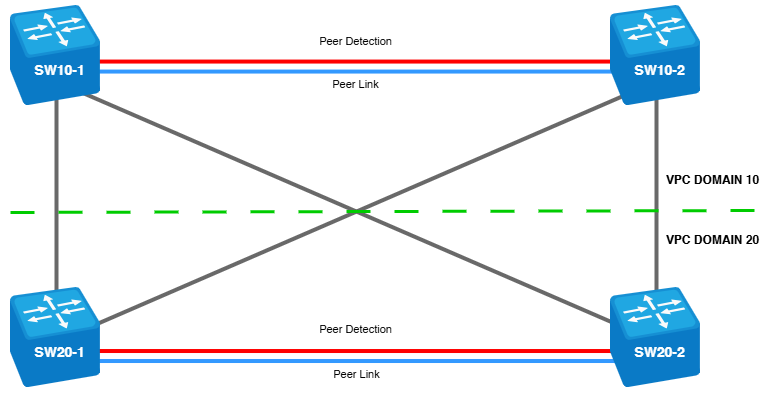
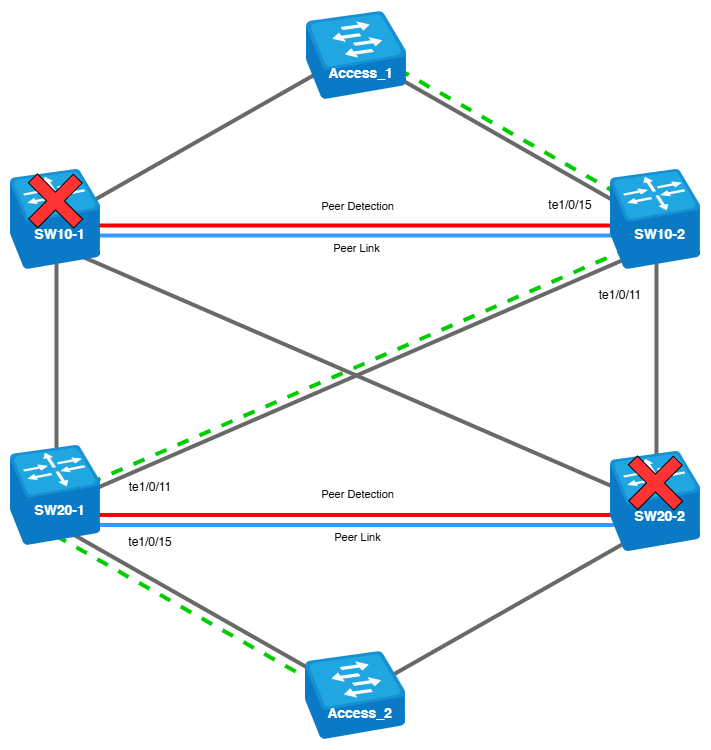
نمودار ارائهشده، تقسیمبندی conditional دامنههای VPC را نشان میدهد.
در طرح ارائهشده، Access Switches بهعنوان کلاینتها استفاده شدهاند، اما در عمل، این تجهیزات میتوانند هر نوع دستگاه پایانی مانند سرور یا Upstream Devices در شبکه باشند. در زمینه VPC، تنظیمات Port-Channel برای این تجهیزات مشابه خواهد بود.
بررسی تنظیمات VPC برای Domain 10:
SW10-1
vpc
vpc domain 10
peer detection
peer detection ipaddr 10.10.10.2 10.10.10.1
peer keepalive
role priority 1
system priority 1
peer link port-channel 1
exit
!
interface TenGigabitEthernet1/0/1
ip address 10.10.10.1 255.255.255.252
exit
!
interface TenGigabitEthernet1/0/2
channel-group 1 mode auto
exit
!
interface TenGigabitEthernet1/0/3
channel-group 1 mode auto
exit
SW10-2
vpc
vpc domain 10
peer detection
peer detection ipaddr 10.10.10.1 10.10.10.2
peer keepalive
role priority 2
system priority 2
peer link port-channel 1
exit
!
interface TenGigabitEthernet1/0/1
ip address 10.10.10.2 255.255.255.252
exit
!
interface TenGigabitEthernet1/0/2
channel-group 1 mode auto
exit
!
interface TenGigabitEthernet1/0/3
channel-group 1 mode auto
exit
SW10-1
vpc
vpc domain 10
peer detection
peer detection ipaddr 10.10.10.2 10.10.10.1
peer keepalive
role priority 1
system priority 1
peer link port-channel 1
exit
!
interface TenGigabitEthernet1/0/1
ip address 10.10.10.1 255.255.255.252
exit
!
interface TenGigabitEthernet1/0/2
channel-group 1 mode auto
exit
!
interface TenGigabitEthernet1/0/3
channel-group 1 mode auto
exit
SW10-2
vpc
vpc domain 10
peer detection
peer detection ipaddr 10.10.10.1 10.10.10.2
peer keepalive
role priority 2
system priority 2
peer link port-channel 1
exit
!
interface TenGigabitEthernet1/0/1
ip address 10.10.10.2 255.255.255.252
exit
!
interface TenGigabitEthernet1/0/2
channel-group 1 mode auto
exit
!
interface TenGigabitEthernet1/0/3
channel-group 1 mode auto
exit
تنظیمات Domain 20 VPC:
SW20-1
vpc
vpc domain 20
peer detection
peer detection ipaddr 20.20.20.2 20.20.20.1
peer keepalive
role priority 1
peer link port-channel 1
exit
!
interface TenGigabitEthernet1/0/1
description Peer-Detection
ip address 20.20.20.1 255.255.255.252
exit
!
interface TenGigabitEthernet1/0/2
channel-group 1 mode auto
exit
!
interface TenGigabitEthernet1/0/3
channel-group 1 mode auto
exit
SW20-2
vpc
vpc domain 20
peer detection
peer detection ipaddr 20.20.20.1 20.20.20.2
peer keepalive
role priority 2
peer link port-channel 1
exit
!
interface TenGigabitEthernet1/0/1
description Peer-Detection
ip address 20.20.20.2 255.255.255.252
exit
!
interface TenGigabitEthernet1/0/2
channel-group 1 mode auto
exit
!
interface TenGigabitEthernet1/0/3
channel-group 1 mode auto
exit
SW20-1
vpc
vpc domain 20
peer detection
peer detection ipaddr 20.20.20.2 20.20.20.1
peer keepalive
role priority 1
peer link port-channel 1
exit
!
interface TenGigabitEthernet1/0/1
description Peer-Detection
ip address 20.20.20.1 255.255.255.252
exit
!
interface TenGigabitEthernet1/0/2
channel-group 1 mode auto
exit
!
interface TenGigabitEthernet1/0/3
channel-group 1 mode auto
exit
SW20-2
vpc
vpc domain 20
peer detection
peer detection ipaddr 20.20.20.1 20.20.20.2
peer keepalive
role priority 2
peer link port-channel 1
exit
!
interface TenGigabitEthernet1/0/1
description Peer-Detection
ip address 20.20.20.2 255.255.255.252
exit
!
interface TenGigabitEthernet1/0/2
channel-group 1 mode auto
exit
!
interface TenGigabitEthernet1/0/3
channel-group 1 mode auto
exit
نکتهها:
1) برای Peer Detection، باید از یک اینترفیس فیزیکی با آدرس IP تنظیمشده استفاده شود. بسیار مهم است که تأثیر لایه دوم (L2) در پیامرسانی این لینک حذف شود.
2) برای Peer Detection، لازم است اینترفیسی با شماره ترتیبی کمتر از شماره ترتیبی اینترفیسهای موجود در Peer-Link اختصاص داده شود. در این مثال، برای Peer Detection از اینترفیس te1/0/1 استفاده شده است.
3) اینترفیسهایی با حداکثر پهنای باند باید بهعنوان Peer-Link تعیین شوند. از آنجا که در این مثال از سوئیچهای MES53xxA استفاده شده است، Peer-Link از دو اینترفیس XG te1/0/2-3 تشکیل شده است.
Monitoring the States of Pairs:
VPC Domain 10 :
SW10-1#show vpc
VPC is enabled
VPC domain 10
VPC role Primary
peer detected (peer-link)
role-priority 1
peer keepalive enabled
system priority 32768
peer detection enabled
peer link Po1
SW10-2#show vpc
VPC is enabled
VPC domain 10
VPC role Secondary
peer detected (peer-link)
role-priority 2
peer keepalive enabled
system priority 32768
peer detection enabled
peer link Po1
VPC Domain 20 :
SW20-1#show vpc
VPC is enabled
VPC domain 20
VPC role Primary
peer detected (peer-link)
role-priority 1
peer keepalive enabled
system priority 32768
peer detection enabled
peer link Po1
SW20-2#show vpc
VPC is enabled
VPC domain 20
VPC role Primary
peer detected (peer-link)
role-priority 2
peer keepalive enabled
system priority 32768
peer detection enabled
peer link Po1
VPC Domain 10 :
SW10-1#show vpc
VPC is enabled
VPC domain 10
VPC role Primary
peer detected (peer-link)
role-priority 1
peer keepalive enabled
system priority 32768
peer detection enabled
peer link Po1
SW10-2#show vpc
VPC is enabled
VPC domain 10
VPC role Secondary
peer detected (peer-link)
role-priority 2
peer keepalive enabled
system priority 32768
peer detection enabled
peer link Po1
VPC Domain 20 :
SW20-1#show vpc
VPC is enabled
VPC domain 20
VPC role Primary
peer detected (peer-link)
role-priority 1
peer keepalive enabled
system priority 32768
peer detection enabled
peer link Po1
SW20-2#show vpc
VPC is enabled
VPC domain 20
VPC role Primary
peer detected (peer-link)
role-priority 2
peer keepalive enabled
system priority 32768
peer detection enabled
peer link Po1
تنظیمات
VPC group
و اینترفیسهای فیزیکی برای
domain grouping بهصورت یکسان برای تمام سوئیچها:
vpc group 2
domain 10
vpc-port port-channel 2
exit
interface TenGigabitEthernet1/0/10
description Link_to_SW20-1
channel-group 2 mode auto
exit
!
interface TenGigabitEthernet1/0/11
description Link_to_SW20-2
channel-group 2 mode auto
exit
vpc group 2
domain 10
vpc-port port-channel 2
exit
interface TenGigabitEthernet1/0/10
description Link_to_SW20-1
channel-group 2 mode auto
exit
!
interface TenGigabitEthernet1/0/11
description Link_to_SW20-2
channel-group 2 mode auto
exit
تنظیمات سوئیچهای
Domain 20:
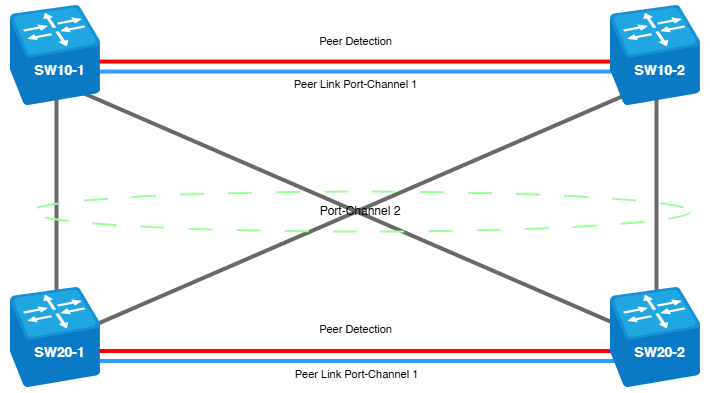
اجرای سوئیچینگ مطابق با طرح هدف:
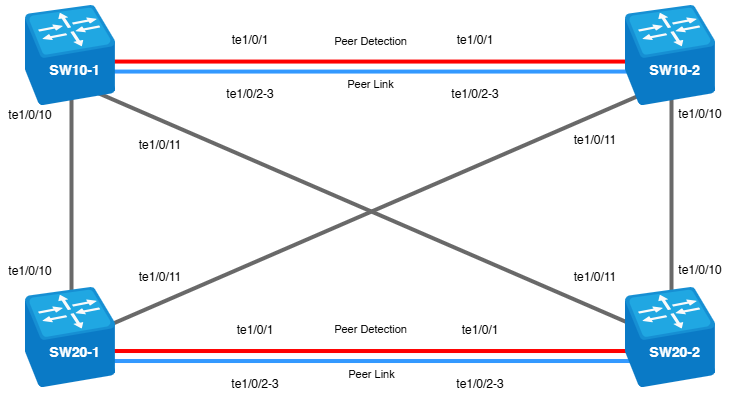
نمودار اتصال و استفاده از اینترفیسهای aggregated:
بررسی صحت سوئیچینگ با استفاده از LLDP:
SW10-1
Port Device ID Port ID System Name Capabilities TTL
---------- ----------------- ----------------- ------------------------------ ------------ -----
te1/0/1 e8:28:c1:8a:bf:00 te1/0/1 SW10-2 B, R 119
te1/0/2 e8:28:c1:8a:bf:00 te1/0/2 SW10-2 B, R 94
te1/0/3 e8:28:c1:8a:bf:00 te1/0/3 SW10-2 B, R 94
te1/0/10 e4:5a:d4:14:00:40 te1/0/10 SW20-1 B, R 92
te1/0/11 e4:5a:d4:14:0d:c0 te1/0/11 SW20-2 B, R 92
SW10-2
Port Device ID Port ID System Name Capabilities TTL
---------- ----------------- ----------------- ------------------------------ ------------ -----
te1/0/1 e8:28:c1:19:24:00 te1/0/1 SW10-1 B, R 111
te1/0/2 e8:28:c1:19:24:00 te1/0/2 SW10-1 B, R 119
te1/0/3 e8:28:c1:19:24:00 te1/0/3 SW10-1 B, R 119
te1/0/10 e4:5a:d4:14:0d:c0 te1/0/10 SW20-2 B, R 90
te1/0/11 e4:5a:d4:14:00:40 te1/0/11 SW20-1 B, R 91
SW20-1
Port Device ID Port ID System Name Capabilities TTL
---------- ----------------- ----------------- ------------------------------ ------------ -----
te1/0/1 e4:5a:d4:14:0d:c0 te1/0/1 SW20-2 B, R 111
te1/0/2 e4:5a:d4:14:0d:c0 te1/0/2 SW20-2 B, R 118
te1/0/3 e4:5a:d4:14:0d:c0 te1/0/3 SW20-2 B, R 118
te1/0/10 e8:28:c1:19:24:00 te1/0/10 SW10-1 B, R 114
te1/0/11 e8:28:c1:8a:bf:00 te1/0/11 SW10-2 B, R 114
SW20-2
Port Device ID Port ID System Name Capabilities TTL
---------- ----------------- ----------------- ------------------------------ ------------ -----
te1/0/1 e4:5a:d4:14:00:40 te1/0/1 SW20-1 B, R 93
te1/0/2 e4:5a:d4:14:00:40 te1/0/2 SW20-1 B, R 95
te1/0/3 e4:5a:d4:14:00:40 te1/0/3 SW20-1 B, R 95
te1/0/10 e8:28:c1:8a:bf:00 te1/0/10 SW10-2 B, R 90
te1/0/11 e8:28:c1:19:24:00 te1/0/11 SW10-1 B, R 90
SW10-1
Port Device ID Port ID System Name Capabilities TTL
---------- ----------------- ----------------- ------------------------------ ------------ -----
te1/0/1 e8:28:c1:8a:bf:00 te1/0/1 SW10-2 B, R 119
te1/0/2 e8:28:c1:8a:bf:00 te1/0/2 SW10-2 B, R 94
te1/0/3 e8:28:c1:8a:bf:00 te1/0/3 SW10-2 B, R 94
te1/0/10 e4:5a:d4:14:00:40 te1/0/10 SW20-1 B, R 92
te1/0/11 e4:5a:d4:14:0d:c0 te1/0/11 SW20-2 B, R 92
SW10-2
Port Device ID Port ID System Name Capabilities TTL
---------- ----------------- ----------------- ------------------------------ ------------ -----
te1/0/1 e8:28:c1:19:24:00 te1/0/1 SW10-1 B, R 111
te1/0/2 e8:28:c1:19:24:00 te1/0/2 SW10-1 B, R 119
te1/0/3 e8:28:c1:19:24:00 te1/0/3 SW10-1 B, R 119
te1/0/10 e4:5a:d4:14:0d:c0 te1/0/10 SW20-2 B, R 90
te1/0/11 e4:5a:d4:14:00:40 te1/0/11 SW20-1 B, R 91
SW20-1
Port Device ID Port ID System Name Capabilities TTL
---------- ----------------- ----------------- ------------------------------ ------------ -----
te1/0/1 e4:5a:d4:14:0d:c0 te1/0/1 SW20-2 B, R 111
te1/0/2 e4:5a:d4:14:0d:c0 te1/0/2 SW20-2 B, R 118
te1/0/3 e4:5a:d4:14:0d:c0 te1/0/3 SW20-2 B, R 118
te1/0/10 e8:28:c1:19:24:00 te1/0/10 SW10-1 B, R 114
te1/0/11 e8:28:c1:8a:bf:00 te1/0/11 SW10-2 B, R 114
SW20-2
Port Device ID Port ID System Name Capabilities TTL
---------- ----------------- ----------------- ------------------------------ ------------ -----
te1/0/1 e4:5a:d4:14:00:40 te1/0/1 SW20-1 B, R 93
te1/0/2 e4:5a:d4:14:00:40 te1/0/2 SW20-1 B, R 95
te1/0/3 e4:5a:d4:14:00:40 te1/0/3 SW20-1 B, R 95
te1/0/10 e8:28:c1:8a:bf:00 te1/0/10 SW10-2 B, R 90
te1/0/11 e8:28:c1:19:24:00 te1/0/11 SW10-1 B, R 90
هنگام اتصال، وضعیت VPC تغییر نمیکند، وضعیت اینترفیس Po2 را بررسی کنید:
SW10-1
SW10-1#show interfaces Po2
Port-Channel2 is up (connected)
Interface index is 1001
Hardware is aggregated ethernet interface(s), MAC address is e8:28:c1:19:24:01
Interface MTU is 1500
Link is up for 0 days, 0 hours, 9 minutes and 50 seconds
Link aggregation type is LACP
No. of members in this port-channel: 4 (active 2)
TenGigabitEthernet1/0/10, full-duplex, LACP active, 10000Mbps (active)
TenGigabitEthernet1/0/11, full-duplex, LACP active, 10000Mbps (active)
TenGigabitEthernet3/0/10, LACP passive, 0Mbps (non-candidate)
TenGigabitEthernet3/0/11, LACP passive, 0Mbps (non-candidate)
Active bandwidth is 20000Mbps
15 second input rate is 0 Kbit/s
15 second output rate is 0 Kbit/s
81 packets input, 8320 bytes received
0 broadcasts, 81 multicasts
0 input errors, 0 FCS
0 oversize, 0 internal MAC
0 pause frames received
82 packets output, 8448 bytes sent
0 broadcasts, 82 multicasts
0 output errors, 0 collisions
N/S excessive collisions, 0 late collisions
0 pause frames transmitted
SW10-1
SW10-1#show interfaces Po2
Port-Channel2 is up (connected)
Interface index is 1001
Hardware is aggregated ethernet interface(s), MAC address is e8:28:c1:19:24:01
Interface MTU is 1500
Link is up for 0 days, 0 hours, 9 minutes and 50 seconds
Link aggregation type is LACP
No. of members in this port-channel: 4 (active 2)
TenGigabitEthernet1/0/10, full-duplex, LACP active, 10000Mbps (active)
TenGigabitEthernet1/0/11, full-duplex, LACP active, 10000Mbps (active)
TenGigabitEthernet3/0/10, LACP passive, 0Mbps (non-candidate)
TenGigabitEthernet3/0/11, LACP passive, 0Mbps (non-candidate)
Active bandwidth is 20000Mbps
15 second input rate is 0 Kbit/s
15 second output rate is 0 Kbit/s
81 packets input, 8320 bytes received
0 broadcasts, 81 multicasts
0 input errors, 0 FCS
0 oversize, 0 internal MAC
0 pause frames received
82 packets output, 8448 bytes sent
0 broadcasts, 82 multicasts
0 output errors, 0 collisions
N/S excessive collisions, 0 late collisions
0 pause frames transmitted
اینترفیسهای شامل شده در Virtual Port-Channel روی این سوئیچ Te1/0/10-11 هستند، اما همچنین اینترفیسهای Te3/0/10-11 که متعلق به
remote switch، در این مورد SW10-2، مشخص شدهاند.
وضعیت Po2 مشابه در سایر سوئیچهای مدار.
Onboarding clients:
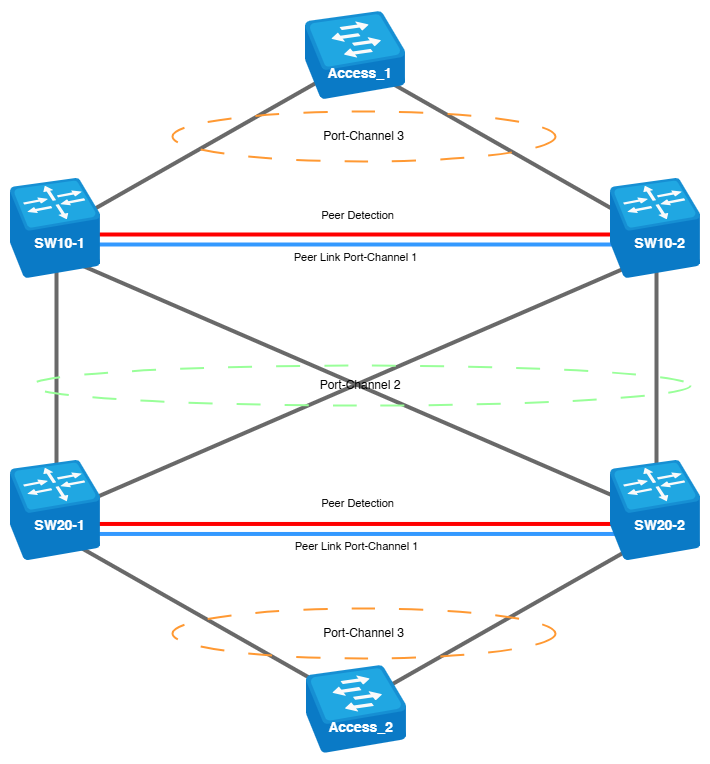
اینترفیسهای Port-Channel 3 در هر دو جفت برای اتصال کلاینتها استفاده خواهند شد.
برای انجام این کار، گروه را به
VPC domains اضافه کنید:
:Domain Configuration 10
vpc group 3
domain 10
vpc-port port-channel 3
exit
vpc group 3
domain 10
vpc-port port-channel 3
exit
:Domain Configuration 20
vpc group 3
domain 20
vpc-port port-channel
exit
vpc group 3
domain 20
vpc-port port-channel
exit
در Port-Channel 3، یک اینترفیس به هر دستگاه اضافه خواهد شد:
interface TenGigabitEthernet1/0/15
channel-group 3 mode auto
interface TenGigabitEthernet1/0/15
channel-group 3 mode auto

برای تغییر ترافیک کلاینت، VLAN ها را روی همه دستگاهها ایجاد کنید:
interface vlan 200
name Customers_L2
exit
interface vlan 200
name Customers_L2
exit
در (Peer Link)، VLAN 200 بهصورت خودکار بر اساس حالت عملیاتی اینترفیس اضافه میشود. با این حال، در تنظیمات Port-Channel 2 و Port-Channel 3، باید VLAN 200 بهصورت دستی با استفاده از دستور switchport trunk allowed vlan all اضافه شود تا همه VLANها، از جمله VLAN 200، روی لینک
trunk
مجاز شوند.
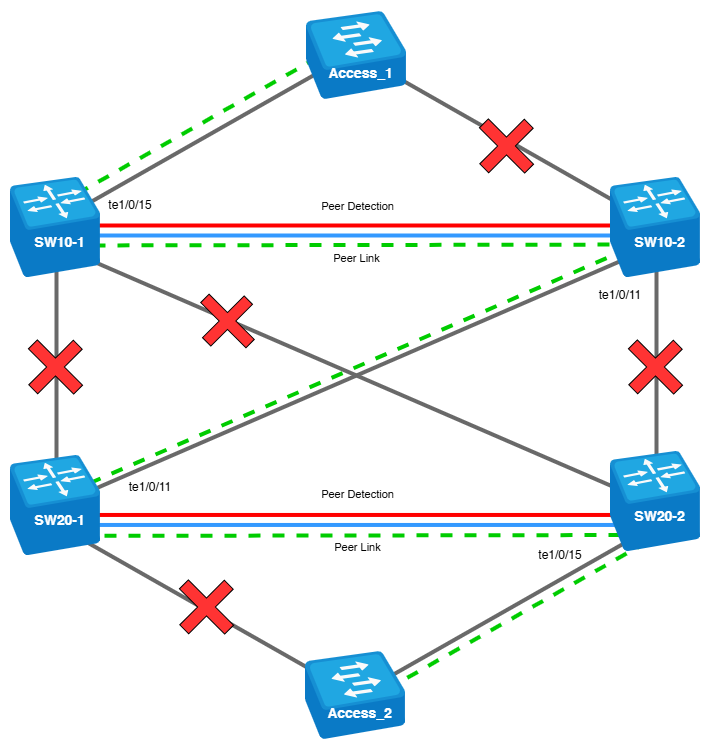
طرح ترافیک L2 کلاینت (icmp ping) از Access_1 به Access_2:
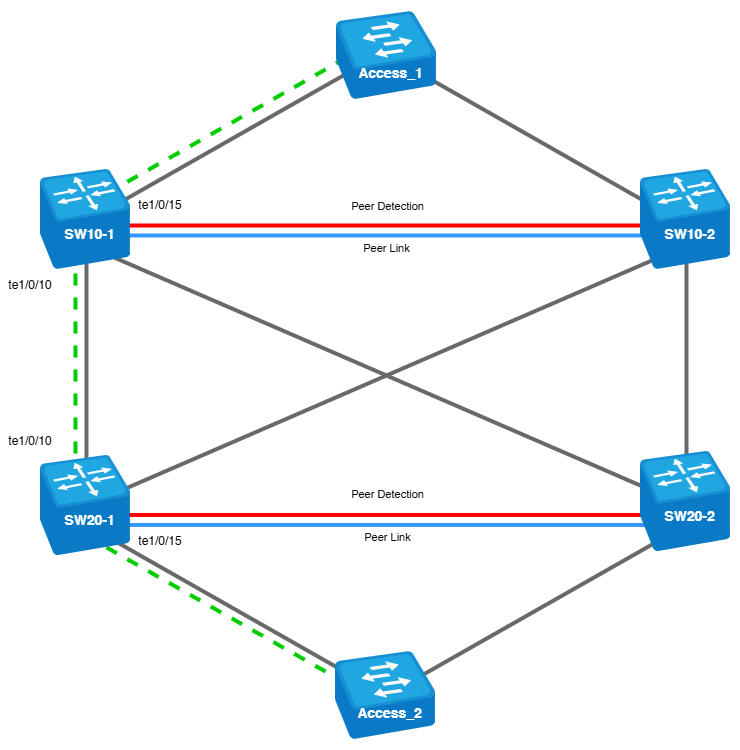
در دیاگرامهای ارائهشده، علامت ضربدر قرمز نشاندهنده لینکها یا گرههای خراب است. در صورت خرابی اینترفیسهای SW10-1 - te1/0/15 و SW20-1 - te1/0/15، جریان ترافیک کلاینت L2 به شرح زیر خواهد بود:
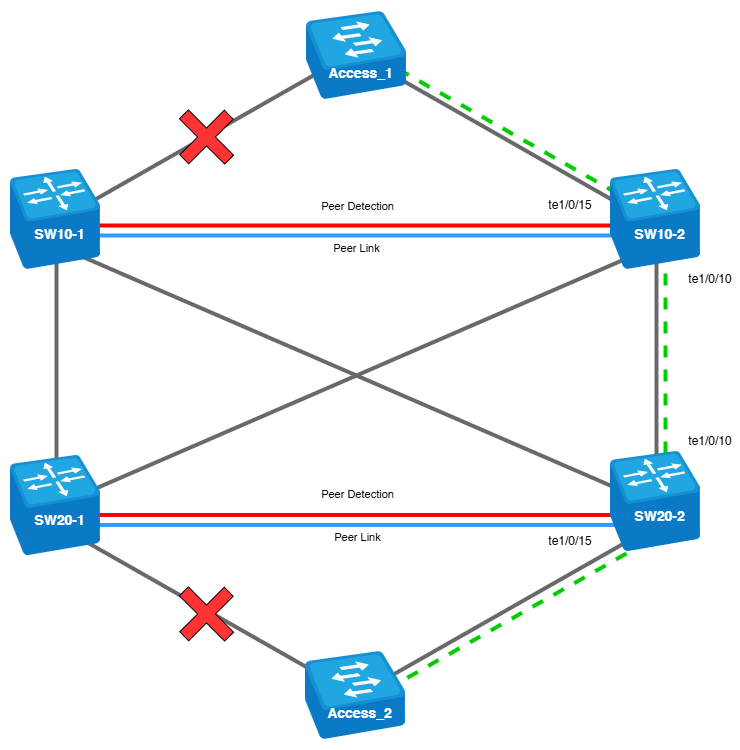
طرح جریان ترافیک L2 مشتری در صورت خرابی SW10-1 و SW20-2:
بررسی میزان تعامل Peer-Link هر جفت.