بسته rsyslog یک نرمافزار
open source است که برای پردازش لاگها طراحی شده و آنها را در فرمتهای مختلف خروجی میدهد. rsyslog توسط کارکنان Eltex توسعه نیافته است و تغییرات آن فقط محدود به تنظیمات است.
نصب rsyslog
برای نصب rsyslog، از دستورات زیر استفاده کنید:
root@root:/# apt update
root@root:/# apt install rsyslog
root@root:/# apt update
root@root:/# apt install rsyslog
پس از نصب، برای راهاندازی خودکار و شروع به کار rsyslog باید دستورات زیر را اجرا کنید:
root@root:/# apt update
root@root:/# apt install rsyslog
root@root:/# systemctl enable rsyslog
root@root:/# systemctl start rsyslog
root@root:/# systemctl enable rsyslog
root@root:/# systemctl start rsyslog
تنظیمات rsyslog
تنظیمات شامل فایل اصلی /etc/rsyslog.conf و فایلهای اضافی ایجاد شده در پوشه /etc/rsyslog.d/*.conf است.
1 # /etc/rsyslog.conf configuration file for rsyslog
2 #
3 # For more information install rsyslog-doc and see
4 # /usr/share/doc/rsyslog-doc/html/configuration/index.html
5 #
6 # Default logging rules can be found in /etc/rsyslog.d/50-default.conf
7
8
9 #################
10 #### MODULES ####
11 #################
12
13 module(load="imuxsock") # provides support for local system logging
14 #module(load="immark") # provides --MARK-- message capability
15
16 # provides UDP syslog reception
17 #module(load="imudp")
18 #input(type="imudp" port="514")
19
20 # provides TCP syslog reception
21 #module(load="imtcp")
22 #input(type="imtcp" port="514")
23
24 $ModLoad imudp
25 $UDPServerRun 514
26
27 $ModLoad imtcp
28 $InputTCPServerRun 514
29
30
31# provides kernel logging support and enable non-kernel klog messages
32 module(load="imklog" permitnonkernelfacility="on")
33
34 ###########################
35 #### GLOBAL DIRECTIVES ####
36 ###########################
37
38 #
39 # Use traditional timestamp format.
40 # To enable high precision timestamps, comment out the following line.
41 #
42 $ActionFileDefaultTemplate RSYSLOG_TraditionalFileFormat
43
44 # Filter duplicated messages
45 $RepeatedMsgReduction on
46
47 #
48 # Set the default permissions for all log files.
49 #
50 $FileOwner root
51 $FileGroup adm
52 $FileCreateMode 0640
53 $DirCreateMode 0755
54 $Umask 0022
55 #$PrivDropToUser syslog
56 #$PrivDropToGroup syslog
57
58 #
59 # Where to place spool and state files
60 #
61 $WorkDirectory /var/spool/rsyslog
62
63 #
64 # Include all config files in /etc/rsyslog.d/
65 #
66 $IncludeConfig /etc/rsyslog.d/*.conf
1 # /etc/rsyslog.conf configuration file for rsyslog
2 #
3 # For more information install rsyslog-doc and see
4 # /usr/share/doc/rsyslog-doc/html/configuration/index.html
5 #
6 # Default logging rules can be found in /etc/rsyslog.d/50-default.conf
7
8
9 #################
10 #### MODULES ####
11 #################
12
13 module(load="imuxsock") # provides support for local system logging
14 #module(load="immark") # provides --MARK-- message capability
15
16 # provides UDP syslog reception
17 #module(load="imudp")
18 #input(type="imudp" port="514")
19
20 # provides TCP syslog reception
21 #module(load="imtcp")
22 #input(type="imtcp" port="514")
23
24 $ModLoad imudp
25 $UDPServerRun 514
26
27 $ModLoad imtcp
28 $InputTCPServerRun 514
29
30
31# provides kernel logging support and enable non-kernel klog messages
32 module(load="imklog" permitnonkernelfacility="on")
33
34 ###########################
35 #### GLOBAL DIRECTIVES ####
36 ###########################
37
38 #
39 # Use traditional timestamp format.
40 # To enable high precision timestamps, comment out the following line.
41 #
42 $ActionFileDefaultTemplate RSYSLOG_TraditionalFileFormat
43
44 # Filter duplicated messages
45 $RepeatedMsgReduction on
46
47 #
48 # Set the default permissions for all log files.
49 #
50 $FileOwner root
51 $FileGroup adm
52 $FileCreateMode 0640
53 $DirCreateMode 0755
54 $Umask 0022
55 #$PrivDropToUser syslog
56 #$PrivDropToGroup syslog
57
58 #
59 # Where to place spool and state files
60 #
61 $WorkDirectory /var/spool/rsyslog
62
63 #
64 # Include all config files in /etc/rsyslog.d/
65 #
66 $IncludeConfig /etc/rsyslog.d/*.conf
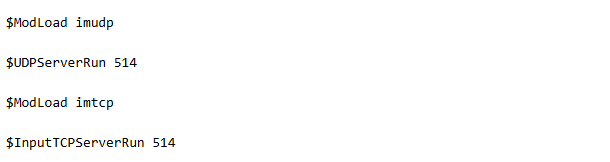
این بخش دریافت پیامهای Syslog از طریق شبکه با استفاده از پروتکلهای UDP و TCP را فراهم میکند.
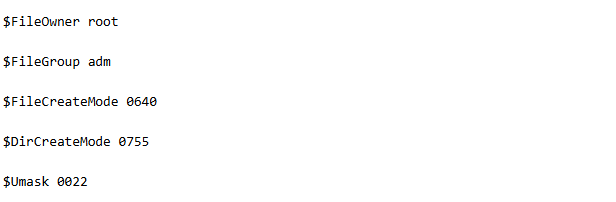
برای تنظیم دسترسی پیشفرض، مالک و گروه فایلهای لاگ، کد مربوطه به شکل زیر است:
برای یکپارچهسازی فایلهای تنظیمات از پوشه /etc/rsyslog.d/ با پسوند conf.، کد مربوطه به صورت زیر است:
$IncludeConfig /etc/rsyslog.d/*.conf
برای ایجاد یک فایل تنظیمات در پوشه /etc/rsyslog.d/ و همچنین یک پوشه ذخیرهسازی لاگ به نام /var/log/eltex با دسترسیهای لازم، کد زیر باید استفاده شود:
root@root:/# mkdir /var/log/eltex
/root@root:/# chown root:adm /var/log/eltex
root@root:/# touch /etc/rsyslog.d/eltex.conf
root@root:/# mkdir /var/log/eltex
/root@root:/# chown root:adm /var/log/eltex
root@root:/# touch /etc/rsyslog.d/eltex.conf
تنظیم فایل پیکربندی eltex.conf به شرح زیر است:
etc/rsyslog.d/eltex.conf/
1 $template FileFormatTemplate,"<%PRI%> 1 %TIMESTAMP:::date-rfc3339% %HOSTNAME% %APP-NAME%-%syslogseverity-text%-%MSGID%: %msg%\n\r"
2
3 $template LogFileTemplate,"/var/log/eltex/%FROMHOST%/%$now%.log"
4
5 $template Templ,"<%PRI%> 1 %TIMESTAMP:::date-rfc3339% %HOSTNAME% %APP-NAME% %msg%\n\r"
6
7
8 if not ($APP-NAME startswith "%") then ?LogFileTemplate;FileFormatTemplate
9 if ($APP-NAME startswith "%") then ?LogFileTemplate;Templ
1 $template FileFormatTemplate,"<%PRI%> 1 %TIMESTAMP:::date-rfc3339% %HOSTNAME% %APP-NAME%-%syslogseverity-text%-%MSGID%: %msg%\n\r"
2
3 $template LogFileTemplate,"/var/log/eltex/%FROMHOST%/%$now%.log"
4
5 $template Templ,"<%PRI%> 1 %TIMESTAMP:::date-rfc3339% %HOSTNAME% %APP-NAME% %msg%\n\r"
6
7
8 if not ($APP-NAME startswith "%") then ?LogFileTemplate;FileFormatTemplate
9 if ($APP-NAME startswith "%") then ?LogFileTemplate;Templ
با فایل پیکربندی و تنظیمات وارد شده، یک پوشه با آدرس مبدا ایجاد میشود که در آن فایلهایی مربوط به تاریخ دریافت پیامها، ذخیره خواهد شد. پیامهای Syslog بر روی سرور به فرمت RFC 5424 تبدیل میشوند. در صورتی که تنظیمات logging origin-id {hostname, ip} در سوئیچ وارد نشده باشد، بخش %APP-Severity-ACTION در پیام تبدیل نخواهد شد.
با تنظیمات وارد شده:

بدون تنظیمات:

Possible fields for parsing
msg - message body
hostname - host name\IP from the message
fromhost - host name from which the message was received
fromhost-ip - IP address of the host from which the message was received (127.0.0.1 for local messages)
syslogtag - name and process number ("rsyslogd[12125]:") that generated the message (extracted from the message)
programname - name of the process that generated the message (extracted from the message)
pri - source and priority as a number
pri-text - decoded source and priority (facility.priority, e.g., syslog.emer)
syslogfacility - only the source as a number
syslogfacility-text - only the decoded source ("local0")
syslogseverity - only the priority as a number
syslogseverity-text - only the decoded severity level ("debug")
timegenerated - time of receipt (with high resolution)
timereported - time extracted from the message
inputname - name of the input module
$hour, $minute - current time
$myhostname - hostname of the processing host
msg - message body
hostname - host name\IP from the message
fromhost - host name from which the message was received
fromhost-ip - IP address of the host from which the message was received (127.0.0.1 for local messages)
syslogtag - name and process number ("rsyslogd[12125]:") that generated the message (extracted from the message)
programname - name of the process that generated the message (extracted from the message)
pri - source and priority as a number
pri-text - decoded source and priority (facility.priority, e.g., syslog.emer)
syslogfacility - only the source as a number
syslogfacility-text - only the decoded source ("local0")
syslogseverity - only the priority as a number
syslogseverity-text - only the decoded severity level ("debug")
timegenerated - time of receipt (with high resolution)
timereported - time extracted from the message
inputname - name of the input module
$hour, $minute - current time
$myhostname - hostname of the processing host